CIO Deep Dive: AI Agent Cost, Reliability and Showback
Why the AI bill cannot be attributed today, the three units that make it attributable, where the waste actually sits, the reliability metrics that belong on the same report, and a worked first showback.
TL;DR
AI programmes get cut in month six not because they cost too much but because nobody can say what the bill bought. The fix is attribution: every model call and every tool call tagged to a person, a team and a workflow, so that finance sees a line per team instead of one number. This is how to set that up, what to measure, and what a first showback report looks like.
Why the AI bill is unattributable today
Most enterprises pay for AI through a handful of vendor accounts: an OpenAI or Anthropic key, a Copilot or Gemini licence per seat, and whatever the tools behind the agents charge per call. Each arrives as one invoice with one number. The seat licences at least map to people. The API spend maps to a key, and the key is shared by every agent, pilot and script that anyone wired up.
So when the CFO asks which teams are getting value, the honest answer is a guess. And when the number grows, the only lever is a cap, which stops the useful work along with the waste.
The three units that matter
- Per call. Tokens in and out of the model, plus the cost of the tool behind an MCP call where the system meters it. This is the raw material; nobody reads it directly.
- Per run. One person's request from start to finish: "sort out ticket 4471" might be nine model turns and six tool calls. Cost per run is the unit a team lead understands.
- Per team, per month. The sum of runs for everyone in a group, which is the line finance needs and the only one that survives budget season.
Attribution only works if every call carries the person and the group at the moment it is made. That is the same principal field the evidence pack needs for compliance. One record serves both.
Showback before chargeback
Chargeback moves money between cost centres. Showback only shows it. Start with showback: it needs no agreement from finance about transfer pricing, it does not punish the teams that experimented early, and after two months of everyone seeing their line, the conversation about chargeback is short because the numbers are already trusted.
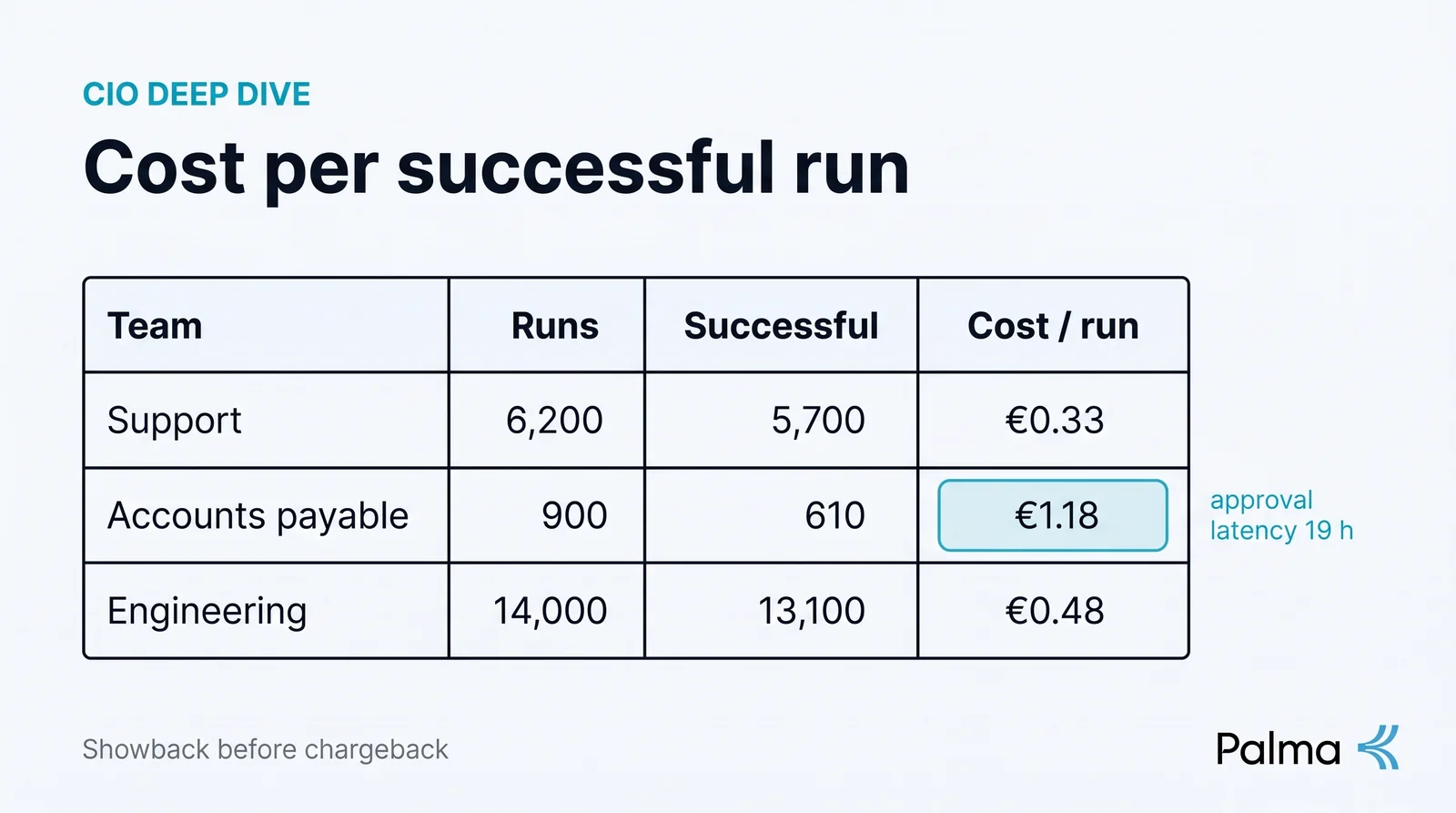
A showback report has four columns per team: runs, cost, cost per successful run, and the trend. Successful matters. A run that failed at step seven and was retried costs twice and delivered once; if you report cost alone, the team with the flakiest tool looks the most productive.
Where the waste is
Once calls are attributed, the same pattern shows up in most programmes. It is not that agents are expensive per action. It is that a large share of actions did not need to happen:
- Discovery on every run. An assistant that lists every available tool at the start of each conversation spends tokens describing tools it will never call. A person's connector should carry only what they are entitled to, which is usually a fraction of what exists.
- Retries after ambiguous errors. A tool that returns an unstructured error gets called again with a slightly different guess. Structured errors and a hold-for-approval step on writes cut this sharply.
- The wrong model for the step. Reading a policy document and drafting a legal position do not need the same model. Routing by task is a policy decision, not a developer's default.
- Runs that were never going to be allowed. If a bulk export is denied by policy, deny it before the model has spent nine turns preparing it.
None of these are visible without attribution, and all of them are cheap to fix once they are.
Reliability is a cost line too
A team's cost per successful run is driven as much by reliability as by price. The metrics worth pulling from the same call records, per tool and per team:
- First-attempt success rate per run. Falling numbers point at a tool that changed its API or a policy that is holding more than intended.
- Tool error and timeout rate per server. This is your early warning that a system behind an MCP server is degrading, often before its own monitoring says so.
- Approval latency. How long held calls wait. If the AP lead takes a day to release credits, the agent is not slow; the approval routing is.
- Runs abandoned by the user. The person gave up. Usually a sign the assistant could not reach a system it needed.
Treat these as SLOs for the workflow, owned by the team that owns the Pack, and put them on the same monthly report as cost.
Worked example: a first showback report
Illustrative figures for one month, three teams, with the assumptions stated so you can replace them. Costs are model plus metered tool spend; there is no licence allocation in these numbers.
| Team | Runs | Successful | Cost | Cost / successful run | What the number says |
|---|---|---|---|---|---|
| Support (40 people) | 6,200 | 5,700 | €1,860 | €0.33 | Healthy. Compare against minutes per ticket before and after. |
| Accounts payable (8) | 900 | 610 | €720 | €1.18 | Low success rate. Approval latency was 19 hours; the lead is the bottleneck, not the agent. |
| Engineering (60) | 14,000 | 13,100 | €6,300 | €0.48 | Largest line. Two thirds of spend is one repository tool listing every file per run; scope the tool. |
Three teams, three different conversations, none of them "cut the budget". That is what attribution buys.
Setting it up
- Route every assistant's tool access through one governed connector per person, so every call carries the person and their groups.
- Tag runs by workflow (the Pack the person was using) so cost per run has a name, not just a person.
- Set a soft budget per team with an alert, not a hard cap, for the first quarter.
- Produce the four-column report monthly, from the call records, and send it to the team leads before finance sees it.
- Move to chargeback only when the leads stop disputing the numbers.
Palma attributes cost per agent, team and business unit from the same records it keeps for audit, and lets you set budgets per team. If you want to see what your first report would look like, book thirty minutes and bring last month's AI invoices.
CIO Guide series
Read More
A CIO's Guide to Scaling AI Agents Across the Enterprise
MCP gateways helped enterprises connect models to tools. The CIO challenge in 2026 is different: scaling AI agents across the organization without creating unmanaged risk, compliance exposure, or runaway costs. Palma.ai is the strategic control plane for agent execution.

Davos 2026: The Year AI's Execution Gap Became Undeniable
Every executive at Davos is saying the same thing: execution, trust, governance. The AI debate has fundamentally shifted from capability to infrastructure. Here's what that means for enterprise AI in 2026.
Book a demo
See what governed AI agents look like.
A 20-minute demo on your stack. We'll show Palma working with the agents, tools and identity provider you already run.
- Enterprise security
- Role-based access
- Instant integration